Five AI keyboard apps stand out for iPhone in 2026, and none of them do everything the same way. Best overall: Gboard, because it pairs Google Translate with reliable predictive typing across every app on your phone. Best for real-time bilingual texting: Microsoft SwiftKey, thanks to a built-in translate flyout you can trigger mid-message. Best for cost-conscious writers: Grammarly Keyboard, which polishes grammar and tone system-wide without adding a second translation subscription.
- Gboard wins overall for iPhone AI keyboard use in 2026 thanks to Google Translate built into the keyboard row.
- Microsoft SwiftKey is the fastest option for translating a reply mid-conversation in Messages or WhatsApp.
- Grammarly Keyboard is the pick for English grammar and tone help across every app, not just email.
- PhraseLift's iPhone keyboard is in development in 2026 — the AI translation and rewriting tool currently runs on Mac.
- Every third-party AI keyboard on iPhone needs 'Allow Full Access' turned on before translation or AI suggestions work.
Why this matters
Apple's default keyboard doesn't translate, doesn't rewrite a stiff sentence, and doesn't remember your tone across apps. If you're texting a client in Spanish, drafting a WhatsApp message in German, or just want your English to read cleaner before you hit send, you need a keyboard that does more than autocorrect.
The catch: swapping your iPhone keyboard means granting a third-party app system-wide access to what you type. That tradeoff is worth understanding before you pick one, and it's why the comparison below leads with what each keyboard can actually see and do, not just what it promises.
What makes the best AI keyboard app for iPhone
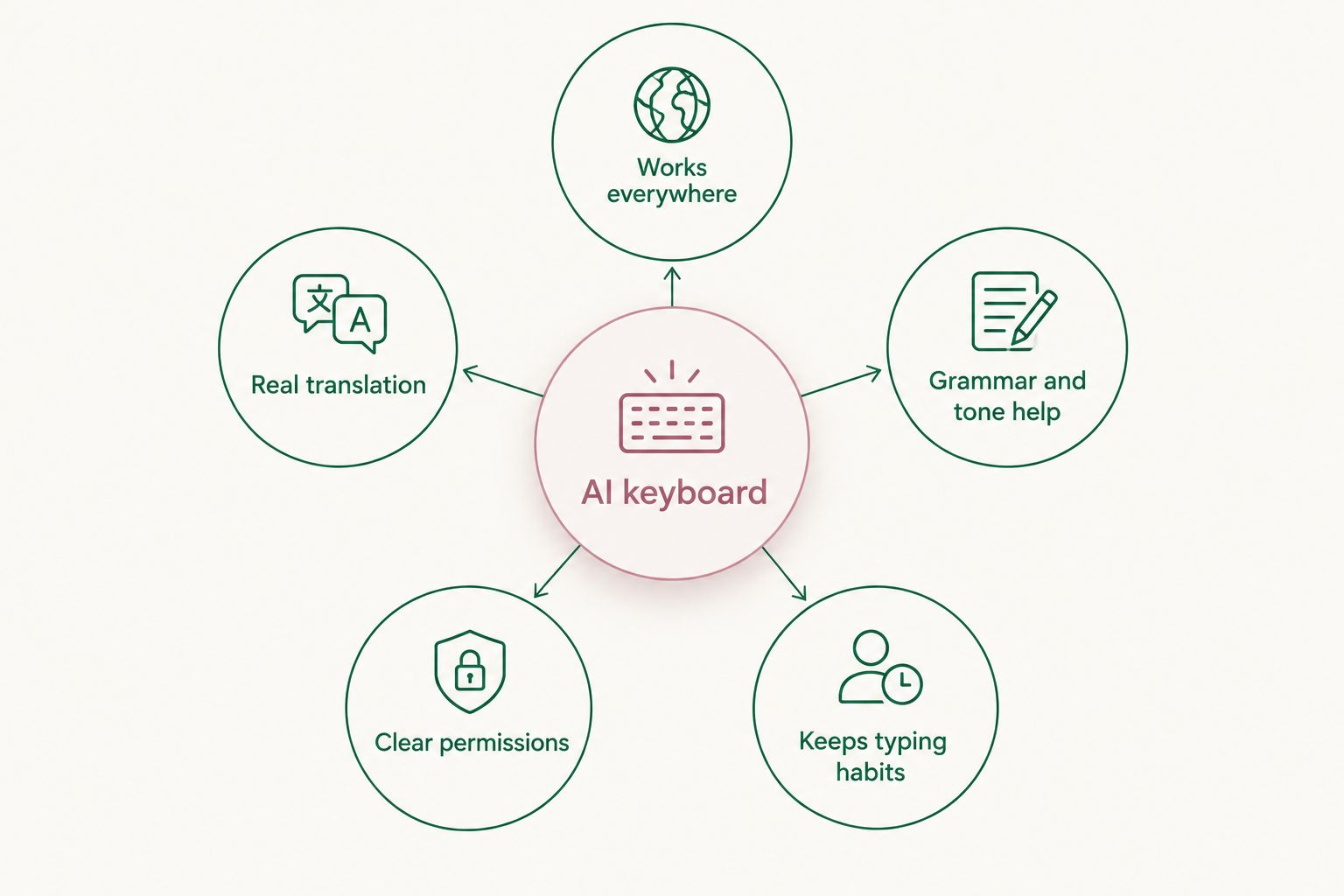
- Works everywhere you type — Messages, WhatsApp, Mail, Notes, not just one app
- Real translation, not just autocomplete — actual language pairs, not guesswork
- Grammar and tone help built into the same keyboard, no app-switching
- Clear permission model — you know what 'Allow Full Access' actually shares
- Keeps your typing habits — swipe, predictive text, and shortcuts still work
- No copy-pasting into a separate translation app to get a usable sentence
AI keyboard apps for iPhone at a glance
| App | Best for | Standout feature | Key limitation |
|---|---|---|---|
| Gboard | Overall daily use | Google Translate built into the keyboard row | Requires a Google account for full translation features |
| Microsoft SwiftKey | Real-time bilingual texting | Translate flyout inside the typing bar | Translation quality varies more by language pair than Gboard's |
| Grammarly Keyboard | English grammar and tone | System-wide grammar and tone suggestions | Not built for translating other languages |
| TypeAI | Quick AI rewrites in chat | One-tap rewrite and reply suggestions | Narrower language support than dedicated translation keyboards |
| Apple's native keyboard + Translate app | Privacy-conscious users | No third-party "Allow Full Access" needed | No inline translation while typing — you switch apps |
1. Gboard: best AI keyboard for iPhone overall
Gboard is Google's keyboard app, and on iPhone it carries Google Translate directly into the typing row so you can convert what you've written without leaving the app you're in. It also keeps Google's swipe typing and prediction, so switching from Apple's default keyboard doesn't cost you speed.
Gboard pros:
- Google Translate access inside the keyboard, not a separate app
- Swipe typing and prediction feel close to Apple's native keyboard
- Broad language coverage, backed by Google Translate's language list
Gboard cons:
- Needs a Google account signed in for full functionality
- Full Access permission is required for translation to work at all
- Layout customization is more limited than some competitors
Verdict: Buy. If you want one keyboard that handles translation and everyday typing without extra setup, Gboard is the safest default in 2026.
2. Microsoft SwiftKey: best for real-time bilingual texting
SwiftKey builds Microsoft Translator into its keyboard flyout, so a message you're about to send can be translated before it leaves your phone. That makes it well suited to back-and-forth conversations in a second language, where speed matters more than polish.
SwiftKey pros:
- Translate flyout works inline, without opening a separate app
- Strong prediction engine that adapts to your typing patterns
- Works across Messages, WhatsApp, and most third-party chat apps
SwiftKey cons:
- Translation quality is less consistent across less common language pairs
- Full Access permission required, same as any third-party keyboard
Verdict: Buy if bilingual texting is your main use case; Hold if you mostly need grammar help in one language.
3. Grammarly Keyboard: best for English grammar and tone
Grammarly Keyboard doesn't translate, but it catches grammar mistakes and tone mismatches as you type, across every app on your iPhone. For someone writing mostly in English but wanting it to read more professional or less blunt, this is a narrower but sharper tool than a translation keyboard.
Grammarly Keyboard pros:
- Grammar and tone suggestions work system-wide, not just in one app
- Catches awkward phrasing before you send, not after
- No language-switching setup required
Grammarly Keyboard cons:
- No translation support — it only works within English
- Some tone suggestions feel generic for casual messages
Verdict: Buy for English writing polish; Skip if translation is your primary need.
4. TypeAI: best for quick AI rewrites in chat
TypeAI is built around one-tap rewrites: turning a rough draft into a cleaner reply directly inside Messages or WhatsApp. It leans on AI rewriting rather than dictionary-style translation, so it's closer to a writing assistant than a language tool.
TypeAI pros:
- Fast rewrite suggestions without leaving the chat
- Useful for tone adjustments, not just grammar fixes
TypeAI cons:
- Narrower language support than Gboard or SwiftKey
- Less useful if your main need is accurate translation, not rewriting
Verdict: Hold — solid for rewriting English replies, not a translation-first pick.
5. Apple's native keyboard + Translate app: best for privacy-conscious users
Apple's built-in keyboard doesn't require Full Access because it never leaves Apple's own system, and the Translate app handles language conversion separately. It's the only option here that doesn't ask you to hand a third-party app system-wide keyboard permissions.
Apple native pros:
- No Full Access permission needed for translation
- No third-party app has visibility into your typing
Apple native cons:
- No inline translation while typing — you copy text into the Translate app
- No grammar or tone coaching built in
Verdict: Skip if convenience matters more than permissions; Buy if privacy is your top priority.
Where PhraseLift fits in 2026
PhraseLift is an AI translation and writing-assistant app built for people who work across languages, but as of 2026 it runs on Mac, not iPhone. The Mac app lets you select any text on your screen and translate it or clean up the writing without copy-pasting into a separate chat window.
The iPhone keyboard is in development and isn't available yet, so it doesn't belong in a ranked list of AI keyboard apps you can install today. If your work happens mostly at a desk, PhraseLift is worth setting up now; if you need something on your iPhone keyboard this week, pick from the five above.
Get AI translation help on Mac today
PhraseLift translates and cleans up text anywhere on your Mac while the iPhone keyboard is built.
How this ranking was built
Each app was checked against the five criteria above: whether it works system-wide, whether it does real translation versus rewriting only, its grammar and tone features, how clear its permission model is, and whether it preserves normal iPhone typing habits like swipe and prediction. Gboard scored highest because it's the only one combining broad language coverage with system-wide reach and familiar typing behavior.
Which AI keyboard should you choose?
If you want one keyboard for everything, install Gboard. If your day is full of quick bilingual replies, SwiftKey's inline translate flyout will save you more time. Pick Grammarly Keyboard if translation isn't the issue and English polish is. And if you already work in PhraseLift on Mac, keep using it there in 2026 while the iPhone keyboard finishes development.
FAQ
What's the best AI keyboard for iPhone in 2026?
Gboard is the best overall pick in 2026 because it combines Google Translate with reliable predictive typing across every iPhone app. Microsoft SwiftKey is the better choice if real-time bilingual texting is your main use case.
Is Gboard better than SwiftKey for translation?
Gboard generally has broader language coverage through Google Translate, while SwiftKey's translate flyout is faster for quick in-conversation replies. Both require enabling Full Access to work.
Does Grammarly Keyboard translate other languages?
No, Grammarly Keyboard focuses on English grammar and tone suggestions and does not translate between languages. Pair it with a dedicated translation keyboard if you need both.
Do AI keyboard apps work in Messages and WhatsApp?
Yes, once you switch your default keyboard in iOS Settings, apps like Gboard, SwiftKey, and Grammarly Keyboard work inside Messages, WhatsApp, and most other chat apps on iPhone.
Is it safe to give a third-party keyboard Full Access?
Full Access lets the keyboard app connect to the network, which is required for translation and AI suggestions to function. Review each app's privacy policy before enabling it, since this permission also lets the keyboard developer see typed text.
Is PhraseLift's AI keyboard available for iPhone in 2026?
Not yet. PhraseLift's iPhone keyboard is in development in 2026, and the current PhraseLift app runs on Mac for translating and rewriting selected text.
Can I use an AI keyboard without translation features?
Yes, Grammarly Keyboard and TypeAI focus on grammar, tone, and rewriting in English rather than translation, which suits users who write in one language but want it to read better.
Do I need to keep Apple's default keyboard installed?
iOS lets you keep multiple keyboards installed and switch between them with the globe icon, so you can use Apple's native keyboard alongside an AI keyboard app without removing either.
One last thing
Every third-party AI keyboard on this list needs "Allow Full Access" turned on in iOS Settings before translation or AI suggestions work — it's an Apple requirement for any keyboard that needs network access, not a quirk of one app. Check that setting before assuming a keyboard is broken; it's usually just switched off.