
Offline translation apps solve one specific problem: you lose signal and still need to say something in a language you don't speak. Five apps handle that job well in 2026, and the right one depends on which languages you need offline and how much storage you're willing to give up.
- Apple Translate is the best offline translation app for iPhone and Mac users in 2026.
- Google Translate covers the widest set of offline languages but its packs take up more storage.
- iTranslate and Microsoft Translator both work well as offline phrasebooks for travel and teams.
- Naver Papago handles Korean, Japanese, and Chinese offline better than the general-purpose apps.
- None of these apps rewrite tone or context the way AI-powered tools do once you're back online.
Why this matters
An offline translation app only matters the moment you actually need it: on a flight, in a rural area, or anywhere a data plan doesn't reach. Test it before you travel, not during a layover with 4% battery left.
Most people download one of these apps once, forget to update the language packs for a year, and then wonder why the offline translation feels stiff or outdated. Offline dictionaries go stale. If you're comparing tools for daily multilingual work rather than travel, the calculus is different - the best AI translation apps lean on live models for more natural phrasing, at the cost of needing a connection.
This guide ranks the five real offline contenders on connection-free performance, not marketing copy.
The verdict
Best overall: Apple Translate. Best for language coverage: Google Translate. Best for travelers: iTranslate. Best free option: Microsoft Translator. Best for Korean, Japanese, and Chinese: Naver Papago.
What makes the best offline translation app
- Downloadable language packs that work with zero connection, not just a cached recent phrase
- Camera translation offline for signs, menus, and labels without wifi
- Voice translation offline for real conversations, not just typed text
- Storage footprint of the downloaded packs - some run over a gigabyte per language pair
- Number of offline language pairs, since coverage varies more than people expect
- Cross-device sync so a downloaded pack on your phone also works on a tablet or watch
At a glance
| App | Best for | Standout feature | Key limitation |
|---|---|---|---|
| Apple Translate | iPhone and Mac users | Built into iOS and macOS, no extra app to manage | Fewer offline languages than Google Translate |
| Google Translate | Language coverage | Offline camera translation across the most languages | Packs are large and eat storage fast |
| iTranslate | Travelers | Offline phrasebook built for common travel phrases | Full offline mode sits behind a paid tier |
| Microsoft Translator | Cross-platform teams | Free offline packs across phone, tablet, and desktop | Voice translation offline is weaker than Google's |
| Naver Papago | Korean, Japanese, Chinese | Sharper handling of honorifics and script-heavy languages | Weak coverage outside East Asian languages |
1. Apple Translate: best offline translation app for iPhone and Mac users
Apple Translate ships with iOS and macOS, and it lets you download language packs directly on-device so translation keeps working with no signal at all. It handles text, voice, and conversation mode offline once a pack is downloaded.
Apple Translate pros:
- No separate app install if you already own an iPhone or Mac
- Conversation mode works offline for back-and-forth dialogue
- Tight integration with Siri and system-wide text selection
Apple Translate cons:
- Locked to Apple hardware - no Android or Windows version
- Fewer supported languages offline than Google Translate
- Camera translation offline is more limited than Google's
Best for: iPhone and Mac owners who want offline translation without installing anything new.
Verdict: Buy.
2. Google Translate: best offline translation app for language coverage
Google Translate downloads offline packs per language and still supports camera translation and basic conversation mode without a connection. It's the closest thing to a universal offline translator, covering more language pairs offline than any competitor on this list.
Google Translate pros:
- Widest offline language coverage of any app here
- Offline camera translation for signs and menus
- Free, with no paid tier gating offline features
Google Translate cons:
- Language packs run large and pile up fast on limited storage
- Offline translation quality drops noticeably compared to its online mode
- Voice conversation mode is less reliable offline than Apple's
Best for: anyone who needs offline coverage for less common languages.
Verdict: Buy.
3. iTranslate: best offline translation app for travelers
iTranslate is built around travel use cases - phrasebooks, common questions, and offline packs sized for a trip rather than daily work. The interface leans toward quick lookups rather than long conversations.
iTranslate pros:
- Phrasebook structure makes finding travel phrases fast
- Offline packs are smaller and more storage-friendly than Google's
- Works across iOS, Android, and web
iTranslate cons:
- Full offline mode is a paid feature, not free by default
- Fewer languages supported offline than Google Translate
- Not built for long-form or work-related translation
Best for: short trips where you need quick phrases, not full conversations.
Verdict: Hold - fine for travel, not for daily multilingual work.
4. Microsoft Translator: best offline translation app for cross-platform teams
Microsoft Translator offers free offline language packs across phone, tablet, and desktop, and it syncs conversation history across devices signed into the same account. It's the most consistent free option for teams using a mix of hardware.
Microsoft Translator pros:
- Free offline packs with no paid tier required
- Works consistently across Windows, iOS, and Android
- Multi-device conversation sync is genuinely useful for teams
Microsoft Translator cons:
- Voice translation offline is noticeably weaker than Google's or Apple's
- Interface feels dated compared to newer apps
- Fewer regular language pack updates than Google Translate
Best for: mixed-device teams who want one free app across every laptop and phone in the office.
Verdict: Hold.
5. Naver Papago: best offline translation app for Korean, Japanese, and Chinese
Papago is built by Naver specifically around Korean, and it handles honorifics, script conversion, and regional phrasing in Korean, Japanese, and Chinese better than the general-purpose apps on this list. Coverage outside East Asia is thin.
Naver Papago pros:
- Sharper accuracy for Korean, Japanese, and Chinese than Google Translate
- Handles honorifics and formality levels most apps ignore
- Offline packs are compact for its core language set
Naver Papago cons:
- Weak or missing offline support for languages outside East Asia
- Smaller user base means slower bug fixes
- Not a realistic single-app solution if you need European languages too
Best for: anyone working specifically with Korean, Japanese, or Chinese.
Verdict: Buy - if your language needs match its focus. Skip otherwise.
“An offline translation app is only as good as the last time you updated its language pack.”
How we ranked these
Each app was weighed against the same six criteria: offline pack size, number of offline language pairs, camera translation offline, voice translation offline, cross-device sync, and how often the offline dictionaries get refreshed. Apple Translate and Google Translate scored highest on breadth; iTranslate and Papago won on focus for specific use cases.
When offline isn't enough
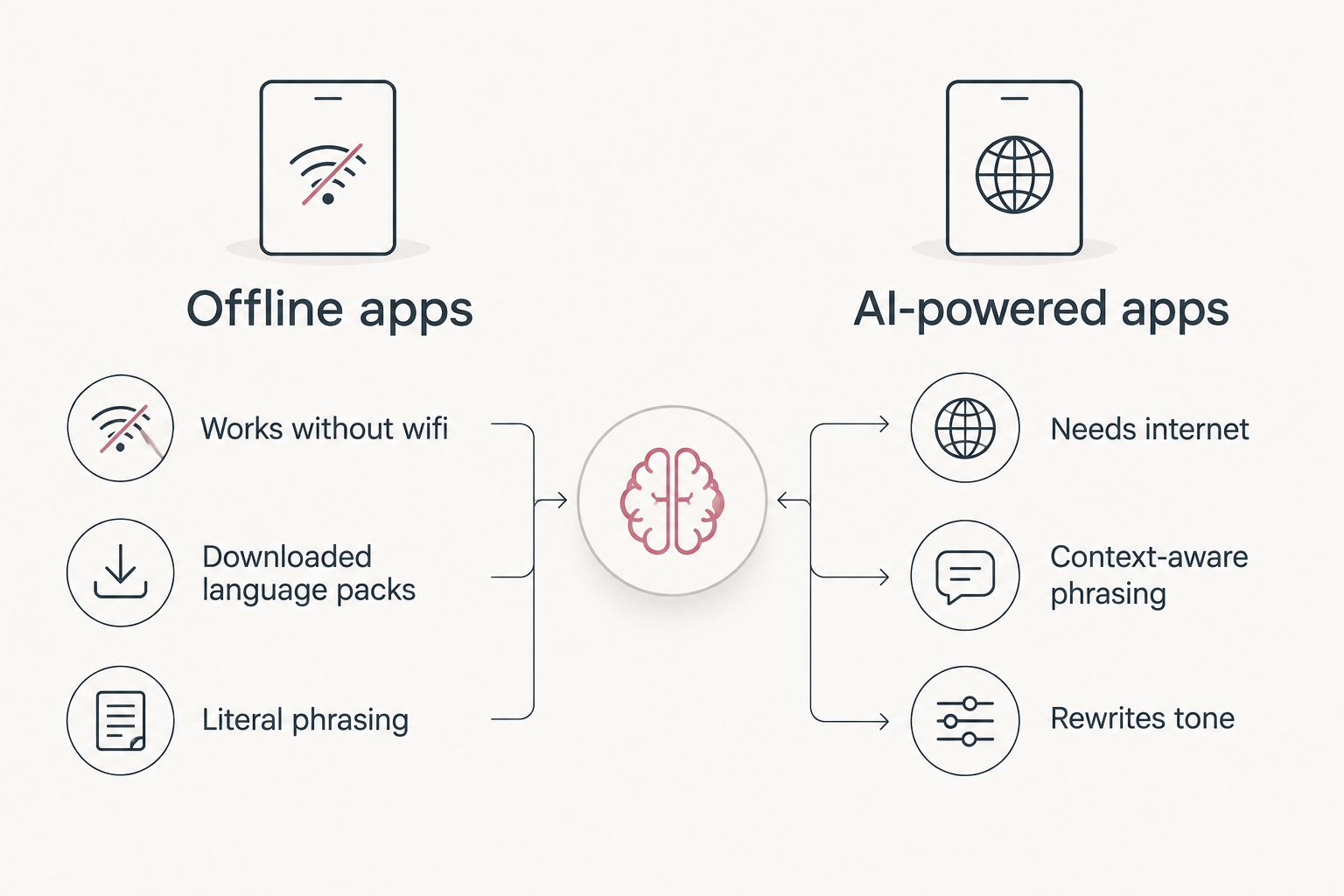
Offline translation apps are built for one job: get a rough meaning across with zero connection. They're not built to catch tone, rewrite a message so it sounds natural, or help you draft something in a second language rather than just convert it.
That's a different job, and it needs an internet connection to run a real AI model. PhraseLift translates selected text anywhere on a Mac - in Messages, WhatsApp, email, or a document - using a keyboard shortcut, and it can also rewrite a rough draft so it reads naturally in the target language. An iPhone keyboard version is in development, but it isn't available yet, so today PhraseLift is a Mac-only, online tool.
That trade-off is the real decision point in 2026: offline apps for connection-free moments, an AI-powered tool like PhraseLift for everyday work where you have wifi and want the translation or rewrite to actually sound right.
Which offline translation app should you choose?
If you own an iPhone or Mac and want one offline app with no extra install, Apple Translate is the default pick for 2026. If you need the widest language coverage or you're on Android, Google Translate covers more ground, at the cost of storage space.
Travelers who just need a phrasebook for a week abroad get more out of iTranslate. Teams juggling mixed devices should default to Microsoft Translator since it's free across the board. Anyone working specifically in Korean, Japanese, or Chinese should skip the general apps entirely and go straight to Naver Papago.
None of the five replace a connected AI tool for daily multilingual writing - they're built for the moments you have no signal at all.
Compare AI translation apps for Mac
See how connected AI tools stack up against offline apps for daily use.
FAQ
What is the best offline translation app in 2026?
Apple Translate is the best offline translation app for iPhone and Mac users in 2026 because it's built into the operating system and downloads full language packs on-device. Google Translate is the better pick if you need broader language coverage.
Does Google Translate work without wifi?
Yes, Google Translate works without wifi once you download a language pack, including camera and basic conversation translation. Quality drops slightly compared to its online mode.
Is Apple Translate better than Google Translate offline?
Apple Translate is easier to use if you're already on an iPhone or Mac, but Google Translate supports more languages offline. Pick Apple Translate for simplicity, Google Translate for coverage.
Can I translate without an internet connection at all?
Yes, apps like Apple Translate, Google Translate, iTranslate, and Microsoft Translator all support fully offline translation once you've downloaded the relevant language pack in advance.
How much storage do offline translation packs use?
Offline language packs vary by app, with Google Translate's packs generally running larger than Apple Translate's or iTranslate's. Check available storage before downloading multiple languages.
Do offline translation apps work as well as online ones?
No, offline translation is generally less accurate than online translation because it can't access the larger AI models that run in the cloud. Offline mode is built for basic communication, not nuance.
What's the best offline translation app for travel?
iTranslate is the best offline translation app for travel because its phrasebook format is built around quick, common travel phrases rather than long conversations.
Is PhraseLift an offline translation app?
No, PhraseLift is an AI-powered translation and writing tool for Mac that requires an internet connection. It's built for translating selected text and improving drafts, not for offline use.
One last thing
Download a language pack today and check the date it last updated - most people never do, and a two-year-old offline dictionary misses slang, new place names, and phrasing that's shifted since it was built. Refresh your offline packs before a trip, not during one.